Download the technical SEO agent and plug it into your Claude.
Six modules to copy into your skills folder: indexing, Core Web Vitals, JSON-LD structured data, internal linking by structure, internal linking by Search Console, cannibalization. Each one returns a report, none of them touches your site.
IntroductionWho this is for, what you will know by the end, how to read this guide.
Chapter 1 · From assistant to agentThe 4 components of an agent, why build one, the commodity problem.
Chapter 2 · From Claude Cowork to ObsidianThe move to the Terminal in 7 steps (15 minutes), with the real commands.
Chapter 3 · The foundation: the vault and the doctrineThe raw/wiki structure, the full AGENTS.md file.
Chapter 4 · Proprietary dataWhat to collect, the 5-step ingestion workflow, finding information again.
Chapter 5 · The agent's skillsAnatomy, a full SKILL.md ready to copy, the catalog of 9.
Chapter 6 · The voiceThe my-voice.md corpus, the anti-AI-writing checklist, the rule of 80.
Chapter 7 · Workflows and quality controlThe 4 workflows (audit, keywords, writing, tracking) and the check before anything ships.
Chapter 8 · The four loopsCapture, validation, learning, hardening, and the production loop drawn step by step.
Chapter 9 · RoutinesThe menu of 9 possible automations, and the code to set them up.
Chapter 10 · Managing your agentThe checkpoints, corrections that become rules, model tiering.
Chapter 11 · The non-negotiable rulesSeven rules you never break.
FAQ · The questions that keep coming backThe real blockers, anonymized.
Going furtherThe system installed 1:1, and the ready-made keyword agent.
Introduction
Before you start
Tomorrow, companies will stop paying for day rates. They will pay for your system. Mine does 80% of my SEO. The remaining 20% is me: the strategy, the proprietary data, the judgment. And that 20% is exactly what gets billed.
This guide takes you from 0 to 1: from the chatbot to the agent. The same Claude, but with your memory, your processes and your data. It runs on a schedule and learns from what it publishes. A junior consultant available 24/7: you steer, it executes.
A warning right away, because it is the trap: an SEO agent is not Claude on its own. If you are not good at SEO, Claude will not be good either. The agent amplifies your method, it does not replace it. You stay the manager.
A few definitions
Some vocabulary before we start, because nobody is born knowing what a vault is:
Chatbot: Claude's chat window. You ask a question, it answers, it forgets.
Agent: Claude + your memory + your skills + routines + loops. It acts on your files and improves from one mission to the next.
Cowork: Claude's desktop app. Still the chatbot, with better tooling.
Terminal: the command window on your computer. That is where Claude Code runs, the version of Claude that acts instead of just answering.
Obsidian: a free app to read and organize notes stored as text files.
Vault: Obsidian's word for your notes folder. A plain folder of text files on your computer: it is your agent's memory.
Skill: your method encoded in a file, written once, executable forever.
Routine: a task that starts on its own, at a fixed time, automatically.
Loop: what gets published comes back measured, and the measurement corrects the next decisions. This is what makes the system learn.
Autonomy level: the share of the work that happens automatically. A skill runs when you ask, a routine starts on its own. From skill to routine, you step in less and less.
Who this is for
This guide is for you if you already use Claude for your SEO. Consultant, freelancer, in-house, it does not matter. If you have never opened Claude for SEO, start with the first guide, otherwise you will drown. And I prefer to be honest right away: there is no magic prompt in here. You do not build an agent in one afternoon. You build it over several sessions, chapter by chapter. Once again: if you are not good at SEO, Claude will not be good. The agent amplifies your method, it does not replace it.
What you will know by the end
The real difference between an assistant and an agent (4 components)
Moving from Claude Cowork to Obsidian + Claude Code without losing anything
Setting up the vault: the folder structure that acts as memory, with the raw/wiki rule
Writing your doctrine: the full AGENTS.md file, ready to adapt
Feeding the agent your proprietary data with a 5-step ingestion workflow
The anatomy of an agent skill and a complete SKILL.md ready to copy
The four loops that make the system learn (with the full proof sheet)
Automatic routines: cron, GitHub Actions and Claude's cloud Routines, code included
The role you keep: manager, with precise checkpoints
How to read this guide
Roughly: first I explain quickly, then we build the foundations of your system. Chapters 1 to 4, you read in order: the principle, the move from Cowork to the terminal, the vault, the data. That is the base, do not skip it. From chapter 5, you build: the skills, the voice, the workflows, the loops, the routines. You can start producing from chapter 5, no need to wait for the end of the guide. And chapter 11 holds the non-negotiable rules. Keep it within reach, it is what saves you from the expensive mistakes.
Chapter 1
From assistant to agent
An assistant answers and forgets. An agent remembers, executes your method, runs on a schedule and corrects itself with your real results. The difference comes down to 4 components.
The 4 components
When you open Claude and ask a question, you are using an assistant. It is good, but it starts from zero at every conversation. You re-explain your client, your industry, your rules. The result depends on the prompt you wrote that day.
An agent is the same Claude, plus four things you build around it:
The 4 components of an agent
─────────────────────────────────────────────────────

 1. MEMORY         a vault of markdown files
        |          the agent re-reads every session
        ▼
 2. SKILLS         your methods, encoded, versioned,
        |          executable forever
        ▼
 3. ROUTINES       tasks that start on their own,
        |          at fixed times, automatically
        ▼
 4. LOOPS          what gets published comes back
                   measured, and corrects decisions
─────────────────────────────────────────────────────
 Assistant = Claude alone.  Agent = Claude + these 4.
The 4 components, in the order you build them. Each chapter of this guide sets one up.
And to keep things straight: skill, workflow, loop, routine are not the same thing. Each is an autonomy level, meaning the share of the work that happens automatically. A skill runs when you ask. A routine starts on its own, at a fixed time. The workflow and the loop sit in between:
From skill to routine
─────────────────────────────────────────────────────────
 SKILL      an isolated competence. Does ONE precise
            thing (quick wins, internal links…)     ch. 5
     ↓
 WORKFLOW   skills chained together. Delivers a
            complete result (the 8-phase audit…)    ch. 7
     ↓
 LOOP       a closed circuit: what comes out goes
            back to correct what goes in. The
            system stops just producing, it LEARNS  ch. 8
     ↓
 ROUTINE    what launches all of it at fixed
            times, automatically                    ch. 9
─────────────────────────────────────────────────────────
 A skill executes. A workflow delivers. A loop learns.
 A routine runs. The agent is all four together.
The classic mistake: stopping at skills and believing you have an agent. Without the loops, the system produces but does not learn. Without the routines, it only exists when you open it.
Why build one
An SEO tool sells you commodity: keyword volumes everyone has, scores everyone looks at. Nobody pays for commodity. And tomorrow, the bare skill will be commoditized too: market players already sell prefab SEO skills, the value of the skill alone is heading to zero.
What will stay billable is the context you inject (your proprietary data) and the human judgment at the output. The agent is what turns those two things into production at scale. It cannot be copied, because its raw material is you.
The trap to avoid from day one. An SEO agent is not Claude on its own. If you are not good at SEO, Claude will not be good. The agent amplifies your method, it does not replace it. This whole guide rests on that position: you stay the manager, the agent executes.
What you need
Claude Code (Anthropic's command-line tool, where the agent can read and write files), a Claude subscription (Pro is enough to start), git installed, and several sessions ahead of you. You do not build an agent in one afternoon. You build it component by component, producing from the first one (and that is a good thing: a perfect system that never produced a page is worth nothing).
Chapter 2
From Claude Cowork to Obsidian
The first guide ran on Claude Cowork. The agent works in a folder on your computer, opened by two windows: Obsidian for you, Claude Code for it.
Cowork, the right starting point
If you followed the first guide, you work in Claude Cowork: your local working folder, your 9 skills added by drag and drop. It was the right choice to start: zero technical setup, the context persists, the skills fire on their own when your request matches.
Skill seo-quick-win activated. Starting from your export, I will produce the quick-wins table: the pages close to the top 3 whose click-through rate is not keeping up…
Claude Cowork: your skills on the left, the conversation on the right. That is assistant mode, and it works very well.
Why the agent goes local
Except an agent needs things Cowork cannot do. It reads and writes dozens of files per session, and your vault will hold hundreds: Cowork is not built to handle that many at once. Nothing runs on a schedule there either, and routines are the whole point of the agent (we set them up in chapter 9). And going local brings you two things along the way: git records every change, so you can roll anything back, always. And Obsidian shows you your notes and the links between them, so you see what your agent knows instead of guessing.
Same folder, two windows
The move fits in one sentence: your Cowork working folder becomes your vault, and you open it with two tools at the same time. Obsidian is your window: you read, you navigate, you correct. Claude Code is its window: it reads, it writes, it runs the skills, it automates. No sync to manage, it is the same folder on your disk.
# Sales call
Note created by the agent.
Linked: [[grounding-score]],
[[fears-objections]] appeared just now
Terminal · Claude Code
$ cd ~/my-vault
$ claude
> Read AGENTS.md then ingest
  raw/notes/sales-call.md
● Read. Note created:
  wiki/sources/2026-06-sales-call.md
● 2 concepts updated
● log.md updated
Both windows open on the same folder at the same time. On the right, you give the instruction in plain language and Claude Code writes the note. On the left, it appears in Obsidian instantly: you read, you navigate, you correct. No export, no copy-paste.
Your 3 base files. Before going further, your agent must know who you are. It fits in three files at the root of the vault: about-me.md (who you are, what you sell, your typical clients), my-voice.md (your tone of voice: what you do, what you never do) and my-rules.md (your sourcing, writing and SEO rules). Each link opens the template ready to fill in. You fill them once, your agent re-reads them every session. Your 9 skills move over as they are (step 5).
The move, step by step (15 minutes)
This is the move I walk people through at the bootcamp, screen by screen. Follow the steps in order, and at each step I show you what you should see: your screen shows the same thing, you keep going. You do not touch Cowork.
1 · Create your working folder in Documents
Open your file explorer (Mac: Finder · Windows: File Explorer). Go to Documents. Right click → "New folder" → name it my-vault, no spaces, no accents. This folder is where the whole guide gets built. If you already have a working folder from the first guide, do not create a new one: move yours into Documents, and it becomes your vault.
One single rule about the location: the folder stays in Documents, on your disk. Not in iCloud, Google Drive or OneDrive: sync breaks file reading when Claude opens several at once.
Seen in real life. A folder in Google Drive that looks empty even though the files are there: that is "Stream" mode, which exposes a virtual drive the terminal cannot read. Switch Google Drive to "Mirror" mode, or simpler: keep your folder in Documents.
2 · Install Obsidian (to SEE your notes)
Download it for free at obsidian.md. Open it → "Open folder as vault" → pick your working folder. That is it: you now see your files and the links between them.
3 · Install Node.js (needed for what follows)
Go to nodejs.org, download the LTS version, install it (click "Next" all the way through). To check, open your Terminal (Mac: Spotlight → "Terminal" · Windows: Start menu → "PowerShell") and type:
Terminal · you
$ node --version
v20.11.1
# a number shows up = you are good
4 · Install Claude Code (to DRIVE Claude)
In the same Terminal, paste this line, then Enter:
Terminal · you
$ npm install -g @anthropic-ai/claude-code

added 248 packages in 12s
# the exact number varies, no matter: no error = you are good
5 · Put your skills in the right place
The Terminal always reads your skills from one precise folder: .claude/skills at the root of your profile. Cowork stores its own somewhere else, and the two do not talk: that is THE classic blocker. The clean fix is a shortcut (symbolic link) so both look at the same folder. You add a skill once, both see it:
# Mac · if a .claude/skills folder already exists, set it aside
mv ~/.claude/skills ~/.claude/skills-old 2>/dev/null

# then create the link (replace with the path to YOUR skills folder)
ln -s ~/Documents/Cowork/Skills ~/.claude/skills
These commands print nothing when they succeed. No message = you are good. Then you check:
Terminal · you
$ ls ~/.claude/skills
seo-recherche-mots-cles     seo-clustering-mots-cles
seo-brief-contenu           maillage-systeme
seo-mots-cles-decisionnels  indexation-check   …
# your skill folders show up = you are good
On Windows: PowerShell as administrator, then New-Item -ItemType SymbolicLink. If it refuses, turn on Developer Mode in Settings and try again.
6 · Create the CLAUDE.md file (the manual Claude reads on its own)
In Obsidian, create a note named CLAUDE at the root of the folder (Obsidian adds the .md itself), and paste your doctrine into it. That is the AGENTS.md file from chapter 3: the complete starter version is there, ready to copy. Check it sits at the root, not in a subfolder.
7 · Launch and check
Move into your folder, launch Claude, and type /skills:
Terminal · my-vault
$ cd ~/Documents/my-vault
$ claude

  ✳ Claude Code · folder: my-vault

> /skills

Available skills :
  seo-recherche-mots-cles
  seo-clustering-mots-cles
  seo-brief-contenu
  maillage-systeme
  …
You see your list of skills: you are operational. Empty list? Go back to step 5, the folder must be named exactly skills inside .claude.
8 · To restart a session later
In every new Terminal window, you just retype the same two lines:
Terminal · you
$ cd ~/Documents/my-vault
$ claude
How does it work? You have nothing to explain to Claude. As soon as you launch claude inside your folder, it reads the CLAUDE.md on its own, the folder's manual, and it already knows how to work in it. You never re-paste your context again.
Chapter 3
The foundation: the vault and the doctrine
Your agent's memory is a folder of text files versioned with git. Two layers, one golden rule, and a doctrine file read at every session.
Why markdown files
Not a database, not one more SaaS. Text files you can read yourself in any editor (Obsidian if you want to navigate them comfortably), versioned with git so you never lose anything. Claude Code reads and writes these files natively. That is the whole difference with the chat: the agent reads what is there, without you pasting anything each time.
The structure: two layers
my-vault/
├── AGENTS.md              → your doctrine (read every session)
├── raw/                   → raw sources, IMMUTABLE
│   ├── articles/          → monitoring, clippings
│   ├── data/              → Search Console exports, crawls
│   ├── clients/           → client notes, briefs received
│   └── notes/             → your notes, your call transcripts
└── wiki/                  → what the agent digests and structures
    ├── index.md           → the catalog of every page
    ├── log.md             → the journal, append-only
    ├── hypotheses.md      → convictions not yet proven
    ├── contradictions.md  → pages that contradict each other
    ├── ingest-backlog.md  → the digestion backlog, sorted
    ├── sources/           → one note per ingested source
    ├── concepts/          → your SEO concepts (one file each)
    ├── briefs/            → the briefs produced
    └── proofs/            → published content ↔ measured result
The complete vault structure. The registers (hypotheses, contradictions, ingest-backlog, proofs) feed the loops of chapter 8: create them empty right now.
Non-negotiable rule.raw/ is read-only. The agent draws from it, it never touches it. Everything it produces goes into wiki/. That is the separation between your raw material and processed knowledge, and it is what keeps you from polluting your sources.
The doctrine: the AGENTS.md file
At the root, a file Claude reads at the start of every session. It is what keeps the agent from falling back into the average corpus. Here is mine, in starter version, ready to adapt:
# AGENTS.md · SEO agent doctrine

You read this file at the start of EVERY session, then you apply it.

## Mission
Build and maintain a conversion-driven SEO system.
We aim for the qualified lead, not the traffic.

## SEO doctrine (applies to EVERYTHING you produce)
- Conversion first. A page exists to capture a qualified
  email (quote, calculator, meeting).
- Business keywords only: decision-stage and transactional.
  Informational queries are already eaten by AI answers.
- Originality, not copying. We give the information the
  others do not give.
- Search volume is not a relevant selection criterion.

## Hard rules
1. ZERO invented numbers. No source = no claim.
   A missing figure is written "to source", never a
   plausible number.
2. raw/ is immutable. Read-only, always.
3. Every output goes into a wiki/ file, never into a
   volatile chat reply.
4. Every wiki/ page cites its sources and links to at
   least 2 other pages of the vault.
5. Every action is recorded in wiki/log.md:
   ## [YYYY-MM-DD] action | short title
6. If a new source contradicts an existing page:
   do not overwrite. Log the conflict in
   wiki/contradictions.md.
7. Strict anti-AI writing on every piece of copy
   (see raw/notes/my-voice.md and the checklist).

## What you never decide alone
- Publishing content (quality control must pass AND I validate).
- Changing the doctrine or a skill.
- Settling a hypothesis (that goes through a proof sheet,
  real data).
Your doctrine v1. Short on purpose: every rule in it gets applied, every filler rule gets ignored. It will grow with your corrections (chapter 9).
What you have at the end of this chapter: an agent that knows your rules before writing a single line. Initialize git (git init, one save per working session) and move to chapter 4.
What your vault becomes
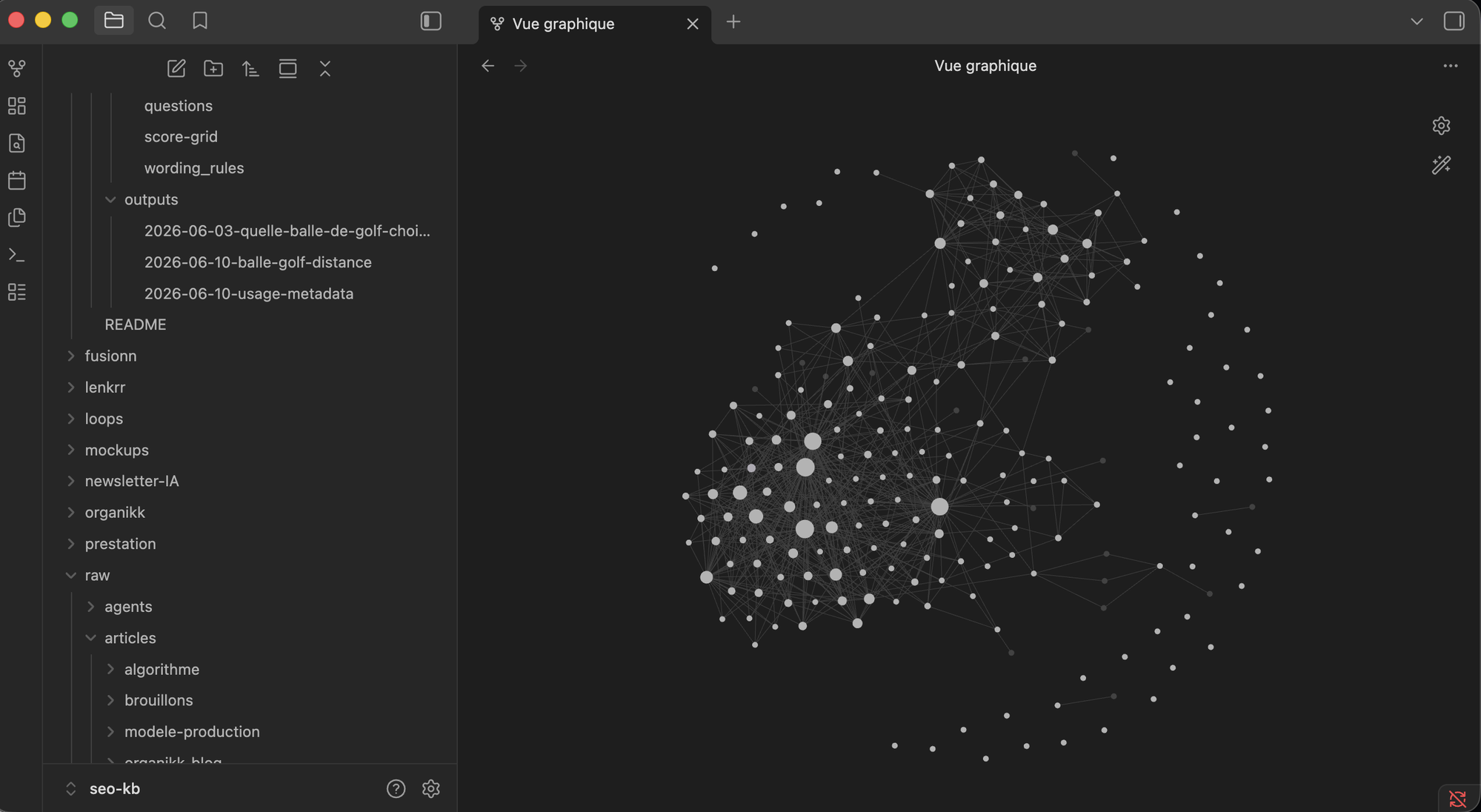
Here is mine today, seen in Obsidian. Every dot is a note (a concept, a source, a proof), every line a link between two notes. This is exactly what this guide has you build, note after note. At the start you will have three dots, and that is normal.
My real vault in Obsidian (graph view). The big dots are the most connected concepts: that is where the agent draws from before producing.
Technical SEO agent · 1:1
I built a complete SEO agent.
The six modules I run on my own sites, ready to copy into your skills folder. We calibrate them on your site together, 1:1 over WhatsApp, and your Obsidian vault plugs in behind as RAG.
Without proprietary data going in, the agent gives you Claude's average corpus. Meaning commodity. Data is what makes your production original and hard to copy.
What you collect
Source
What it gives the agent
Sales calls (transcribed)
Your prospects' exact vocabulary, their real objections, the questions asked before buying
Support tickets, client emails
The real frictions, phrased in the real words
Customer reviews
What they liked, said the way they say it
Search Console
Your real queries, the ones where you already show up without knowing it
Past missions (audits, briefs)
Everything you already learned once, reusable
You anonymize what needs it before dropping anything into raw/. And if you have nothing usable, you do not produce: you start by going to get the data. It is the prerequisite, not an option. I have been repeating it for a long time: you are no longer SEOs who create pages, you are SEOs who collect the data.
The ingestion workflow
Dropping a file is not enough. The agent must digest it, and digestion always follows the same path (you can encode it as a skill, see chapter 5):
Ingesting a source · the mandatory path
─────────────────────────────────────────────────────

 raw/notes/sales-call-X.md          (the source, immutable)
        |
        |  1. READ the file in full
        ▼
 wiki/sources/2026-06-call-X.md     2. STRUCTURED note:
        |                              context, key numbers,
        |                              limits, SEO implications
        ▼
 wiki/concepts/*.md                 3. LINK: update touched
        |                              concepts + flag any
        |                              contradiction
        ▼
 wiki/log.md                        4. LOG one line
        |
        ▼
 inline summary                     5. REPORT: 5 bullets +
                                       "which SEO angle to dig?"
One source at a time. It is slow at first, and that is the point: every digested source enriches the network, and the network makes the next productions better.
Finding information again
At first, text search is enough: the agent digs through the vault with plain word search. When the vault passes a few hundred files, you add a local semantic search index (free, it runs on your computer, nothing to pay). The idea matters more than the tool: the agent must answer "what do we already know about X" before producing anything about X. That is what makes your hundredth brief better than your first.
The real issue. Undigested data is data that does not exist for the agent. Your raw/ folder will always fill up faster than it gets digested, that is normal and that is dangerous. The loop that makes this backlog visible comes in chapter 8.
Where your data goes (privacy and GDPR)
The question always comes up, so let's answer it before anyone asks. Claude Code sends your requests to Anthropic's servers: everything the agent reads to work passes through them for the time of processing. What matters is what Anthropic is allowed to do with it, and that depends on your account type.
On a business account (API, Team, Enterprise), your data is never used to train the models: it is the default setting of the commercial terms, nothing to configure. On a personal account (Free, Pro, Max), since summer 2025 there is a "Help improve Claude" setting in claude.ai → Settings → Privacy. If it is on, your conversations and coding sessions are used for training and kept for 5 years. Turn it off: no training, 30-day retention. It is the first thing to check before dropping client data into your vault.
And do not confuse training with GDPR, they are two different topics. If you handle client data (recorded calls, emails, support tickets), three reflexes: inform participants when you record a call, that is the baseline and it comes before any tool; prefer a business account, because Anthropic then provides a data processing agreement (the DPA) that legally frames the processing; and keep in the vault only what serves, anonymized when possible.
The big advantage of the vault. The raw material stays with you, locally, in your files. Nothing sleeps in a cloud tool. You only send Anthropic what serves the current processing, and on a business account, it never trains their models.
Chapter 5
The agent's skills
A skill is your method encoded once, versioned, executed identically every time. The difference with a prompt: the prompt drifts, the skill improves.
Anatomy of an agent skill
A folder in ~/.claude/skills/, with a SKILL.md file. Claude loads it automatically when your request matches its description. Every skill holds seven sections:
SKILL.md · anatomy of the file
─────────────────────────────────────────────

 ┌─────────────────────────────────┐
 │ ---                             │   file header
 │ name: my-skill                  │   · name = folder name
 │ description: |                  │   · description = what
 │   What the skill does…          │     triggers the skill
 │   ALWAYS use when: …            │     (Claude reads it to
 │ ---                             │     decide to activate)
 ├─────────────────────────────────┤
 │ # Skill · My Skill              │
 │ ## When to trigger              │   markdown body
 │ ## Required input               │   · 7 standard sections
 │ ## Pipeline (N steps)           │   · the "how",
 │ ## Mandatory output             │     step by step
 │ ## Absolute rules               │
 │ ## Related concepts             │
 └─────────────────────────────────┘
The anatomy of a skill. Two YAML fields for automatic triggering, markdown sections for the procedure. The "Absolute rules" section is the one that protects your credibility.
A full SKILL.md, ready to copy
The ingestion skill, the one that runs the workflow from chapter 4. Create the folder ~/.claude/skills/ingest-source/ and paste this into SKILL.md:
---
name: ingest-source
description: |
  Ingest a source into the vault: reads a file from raw/,
  creates the structured note in wiki/sources/, updates the
  touched concepts, logs into wiki/log.md.

  ALWAYS use when the user says: "ingest",
  "digest this file", "add this source to the vault",
  "process raw/...".
---

# Skill · Ingest a source

## When to trigger
A file from raw/ to digest. One source at a time, never
several at once without an explicit request.

## Required input
| Source | Mandatory |
|--------|-----------|
| Path of the file in raw/ | Yes |
| Desired reading angle    | Recommended |

## Pipeline (5 steps)
1. Read the file IN FULL. No skimming.
2. Create wiki/sources/YYYY-MM-DD-short-name.md:
   context, method, key numbers (sourced), limits,
   SEO implications. Short exact quotes only.
3. For each touched concept: if the wiki/concepts/
   page exists, enrich it; otherwise create it with 2
   outgoing links. If the source CONTRADICTS an existing
   page: do not overwrite, log the conflict in
   wiki/contradictions.md.
4. Update wiki/index.md.
5. Append to wiki/log.md:
   ## [YYYY-MM-DD] ingest | title of the source

## Mandatory output
The source note + an inline summary in 5 bullets ending
with: "which SEO angle do you want to dig into?"

## Absolute rules
- raw/ stays intact. Read-only.
- No number repeated without its source.
- One source at a time.

## Related concepts
proprietary-data · ingest-backlog · contradictions
Your agent's first system skill. The SEO skills (research, clustering, brief…) follow exactly the same anatomy.
The catalog: the 9 SEO skills
The details and the full file for each are in the dedicated article (in French): organikk.co/blog/9-skills-seo-claude. Here, their place in the agent:
Skill
What it does
seo-quick-win
The pages stuck between position 3 and position 12, lots of impressions, a click-through rate that does not keep up: you clear this backlog before creating content
seo-cannibalisation
Two pages of the site competing on the same queries: detects the conflict, classifies it, gives the action (merge, differentiate, or nothing)
maillage-systeme
The links between your pages: pillars, hub pages, orphan pages. Dedicated guide with both full internal-linking SKILL.md files (in French): organikk.co/guides
seo-programmatique-pseo
1 template + 1 variable = hundreds of pages
seo-entites-vectorielles
The terms a page must contain to match the targeted intent
seo-cluster-aeo
The content architecture around a pillar keyword, built for answer engines
seo-product-led-seo
The tools (calculator, simulator) that capture purchase-stage queries
seo-peurs-objections
Your prospects' blockers, for content that converts
seo-brief-contenu
The page outline built on what the others did not say
On top of these, the agent adds its system skills, the ones that run the system itself: ingest-source (above, the encoding of chapter 4's ingestion workflow), proof-feedback and weekly-review (chapter 8). And the catalog is not frozen: the 9 are the base, my own system counts 13 today (structured data, Core Web Vitals, AI-resistant keywords, indexing…). Every new skill follows the same anatomy, and you add it when the need shows up, never before.
Installation order
You do not need everything on day one. The order that works: ingest-source first (to feed the vault), then seo-quick-win, the skill I launch first whenever a client gives me access to their Search Console: before thinking about new content, you clear the backlog of opportunities already sitting there. You run it on a real project, and you add the others when the need arrives.
My rule. A badly written skill produces bad work at scale. You build skills one by one, with care, and you fix them every time an output disappoints you. Today's correction is tomorrow's rule (chapter 10).
Chapter 6
The voice
The agent adopts your expressions and your tone of voice. Two files are enough.
The corpus: my-voice.md
A file (or a folder) in raw/notes/ with your own texts: your posts that worked, your emails, your newsletter passages. Plus your rules: what you say, what you never say, your expressions. The agent reads it before every piece of writing and matches the style. You can let Claude generate a first version from your existing content: you open it, you correct it, you validate it.
The anti-AI-writing checklist
A control list the agent runs on every text before handing it back to you. Paste it into raw/notes/anti-ai-writing.md and reference it in the doctrine:
# Anti-AI-writing checklist · run on EVERY text

Banned vocabulary
- crucial, pivotal, revolutionary, game-changing,
  "in today's fast-evolving world", "it is important
  to note", "let's not forget that"

Banned structures
- the systematic rule of 3 (3 reasons, 3 steps, 3 benefits)
- the summary conclusion that repeats what was just said
- the meta-intro ("in this article, we will see…")
- bold on the first words of every paragraph
- decorative bullets replacing prose

Style
- no decorative metaphor: describe the fact, literally
- short sentences alternating with longer ones
- the WHY before the how
- one firm position per text, owned

If one box fails → rework the passage BEFORE delivery.
The v1 checklist. You extend it every time you spot an AI tic in an output: it grows mission after mission.
The rule of 80. The writing standard up to 100, you do not reach it with AI alone. The agent gets you to 80, cleanly, in your voice. The last 20 is your re-read. This is non-negotiable.
And when you install the agent at a client's: you redo this step with THEIR voice. Their corpus, their rules, same method. That is what makes the system reusable without giving away your style.
Chapter 7
Workflows and quality control
An agent that can do nine separate tasks is fine. An agent that chains them in the right order without you driving every step is autonomy.
A skill does one precise thing. A workflow chains several skills to deliver a complete result: one skill's output feeds the next. My system fits in four workflows, calibrated on dozens of projects: the audit, the keywords, the writing, the tracking. It is the rhythm I apply with my clients: the first week sets the foundation, then one workflow per week. After a month, the full cycle has run once.
The 4 workflows · one per week
─────────────────────────────────────────────────────────
 1. AUDIT        "what is wrong with this site"
    Search Console + crawl → prioritized action plan
        ↓
 2. KEYWORDS     "what do we create now"
    topic → pages to create, sorted by conversion
        ↓
 3. WRITING      "we prepare the page"
    brief + content pre-filled in your voice → you
        ↓
 4. TRACKING     "what did it deliver"
    Search Console measures → corrections, quick wins
        │
        └──→ what tracking finds goes back into 1 or 2
─────────────────────────────────────────────────────────
 The agent chains the skills inside each workflow.
 You validate between two workflows.
The full cycle. This month's tracking decides next month's pages: that is what makes the system progress instead of piling up.
Workflow 1 · The complete SEO audit (8 phases)
It answers "what is wrong with this site". 100% Google data and site structure: Claude Pro at $20/month, Search Console, Chrome and Lighthouse. No paid third-party tool. Each phase feeds the next. These are the 7 phases of the first guide's audit, plus a speed phase (1bis) that only exists on the terminal side: hence the 8.
Phase
Skill
Duration
0 · Positioning
none (prompt + Search Console)
20-30 min
1 · Indexing
indexation-check
15-25 min
1bis · Page speed
seo-core-web-vitals
10-15 min
2 · Quick wins
seo-quick-win
15-20 min
3 · Page structure
none (prompt + crawl)
variable
4 · Cannibalizations
seo-cannibalisation
15-20 min
5 · Internal links (2 passes)
maillage-systeme then maillage-interne-gsc
25-40 min
6 · Synthesis + action plan
none (synthesis)
20-30 min
Budget: 2 to 3 hours on the fixed-duration phases, plus 1 to 2 hours on phase 3 depending on site size. Can be spread out. Phase 1bis (speed) only runs on the Terminal side. The report ends on a "months 2-3: new pages on the gaps" horizon, and that is where the keyword workflow takes over.
Workflow 2 · Keywords (3 chained skills)
It answers "what do we create now". Three skills that turn a topic into pages that rank and convert:
The keyword workflow
─────────────────────────────────────────────────────────
 seo-recherche-mots-cles
   topic → 50-150 qualified keywords
   (intent + volume + difficulty)
        ↓
 seo-clustering-mots-cles
   the list → workable groups (1 group = 1 page)
        ↓
 seo-mots-cles-decisionnels
   the groups → the queries that actually convert
        ↓
 seo-brief-contenu / seo-cluster-aeo → the writing
─────────────────────────────────────────────────────────
 Research produces the material, clustering cuts it
 into pages, the decision filter isolates what pays.
 The output feeds the writing workflow.
Strict rule across the whole chain: the agent never invents a volume or a difficulty. It structures and qualifies intent; the numbers come from Search Console or a tool, never from its head.
Workflow 3 · Writing
It starts from a group out of the keyword workflow and prepares the page. I do mean prepare: the agent does not write the page for you, it helps you write it. It creates the brief (seo-brief-contenu): the page outline, the entities to cover, what the already-ranking pages did not say. It brings in your tone of voice (chapter 6) and your prospects' objections (seo-peurs-objections). Then it pre-fills the content, fed by your proprietary data (chapter 4): the final writing is you. And before publishing, quality control, detailed on the next page. Once again: the agent gets you to 80, the last 20 is your re-read.
Workflow 4 · Tracking
It answers "what did it deliver". An honest note first: the agent has no access to your Search Console on its own, it works on an export you drop into the vault (5 minutes per month) or that arrives through the hookup of chapter 9. Once a month, it goes through this export: the pages in position 3 to 12 whose click-through rate does not keep up (seo-quick-win), the pages eating each other on the same keyword (seo-cannibalisation), the internal links to reinforce (maillage-interne-gsc). And every published page has its proof sheet, measured at D+30 and D+90: that is the output → learning loop of chapter 8. What tracking finds goes back into next month's audit or keywords.
Quality control
This is the checkpoint where content is verified before it ships. It holds in four criteria, each answered by a yes or a no:
QUALITY CONTROL · 4 criteria, all mandatory
─────────────────────────────────────────────────────
 [ ] 1. Every numbered claim has its source
        (zero "to source" left in the published text)
 [ ] 2. The anti-AI-writing checklist passes
 [ ] 3. The page answers the brief's targeted intent
        (not the keyword: the INTENT)
 [ ] 4. The page offers a concrete action
        (form, calculator, quote, meeting)

 4/4 → publishable (after YOUR validation)
 otherwise → back to writing, with the failed criterion
A page that fails one criterion does not ship. Even produced at 3am by a routine.
You do not create articles one by one. You create semantic coherence for the client. The agent holds that coherence across hundreds of pages, which no human holds by hand: that is exactly why the control must be written down in black and white, not kept in your head.
My rule. While you are starting out, keep your skills isolated and chain them by hand. You only turn a chain into an automatism once it has run without a hitch 5 times in a row. Not before. Automating a method that is not yet stable means freezing a mistake and replaying it on a loop.
Chapter 8
The four loops
This is the part everyone skips, and it is what separates an agent that produces from an agent that progresses. A system that captures and produces without ever re-reading itself grows, it does not improve.
The agent's 4 closed loops
─────────────────────────────────────────────────────────

 LOOP 1 · capture → processing
 raw/ fills up ──→ weekly sort ──→ backlog listed ──→ ingest
                                          │
 LOOP 2 · doctrine → validation           │
 hypotheses ──→ confronted with sources ──┘
      ▲              │
      │              ▼ statuses: open / testing /
      │                validated / invalidated
      │
 LOOP 3 · output → learning
 published page ──→ proof sheet + dated prediction
      │                    │
      │              D+30 / D+90: Search Console decides
      │                    │
      └──── the verdict corrects the doctrine ◄────┘

 LOOP 4 · correction → hardening
 you correct ──→ register ──→ 2nd time on the same theme
      ▲                              │
      └── the rule enters the doctrine ◄┘ (validated Friday)
─────────────────────────────────────────────────────────
 Without loop 3, "my method works" stays a sales
 argument. Without loop 4, you redo the same corrections
 on every mission. With them, you get facts and rules.
The four loops and their common trait: everything ends up correcting the doctrine. It is the opposite of a system that piles up.
Loop 1 · capture → processing
Your raw/ folder fills up faster than it gets digested. The loop: once a week, the agent compares what sits in raw/ with what was ingested into wiki/sources/, and writes the backlog list into wiki/ingest-backlog.md, sorted by priority (field data first, monitoring second). You decide what to ingest, it ingests.
Loop 2 · doctrine → validation
Your doctrine contains convictions. Some are proven, others are bets. Two registers keep them honest: wiki/hypotheses.md (every unproven conviction, with its status) and wiki/contradictions.md (two vault pages saying opposite things, spotted at ingestion). Once a month, the agent confronts the hypotheses with the sources ingested since the last review and moves the statuses forward.
Hard rule. A hypothesis never turns "validated" on a feeling. It turns validated on a proof sheet backed by real data. Otherwise you build a doctrine that looks solid and is nothing but stacked opinion.
Loop 3 · output → learning
The most profitable of the four. Every published piece of content must come back measured. The mechanism fits in one file, the proof sheet, created at publication:
# wiki/proofs/2026-06-10-calculator-x-page.md

## The bet
- Page: /calculator-x
- Target keyword: "calculator x price"  (decision-stage)
- Hypothesis tested: "a tool page captures more emails
  than an editorial page on the same query"
  → wiki/hypotheses.md #12

## Dated predictions
- D+30: the page gets its first impressions on the
  target query, position ≤ 20
- D+90: ≥ 1 lead attributable to the page

## Measurements (filled by the loop, never by hand)
- D+30 [date]: real position, impressions, clicks → verdict
- D+90 [date]: leads, position → verdict

## Final verdict
- hypothesis #12: confirmed / refuted / inconclusive
- what we take from it for the doctrine:
The full proof sheet. The D+30 and D+90 measurements come from a Search Console export: dropped by hand into the vault, or pulled by the chapter 9 hookup (service account + script). The agent fills the sheet from the export, never from its head.
After a few cycles, the agent no longer decides with your doctrine alone: it decides with your doctrine corrected by your real results. SEO is mathematical tasks you repeat until you find patterns. This loop is what finds the patterns for you.
Loop 4 · correction → hardening
The most recent one at my place, and the one that pays for the other three. When you correct the agent (a rephrased title, a banned word called out, a fixed format), the correction lives in the conversation and dies with it. Three weeks later, you make the same one again. The loop: every correction gets written into a register, wiki/recurring-corrections.md, with a stable theme slug. An isolated occurrence triggers nothing. The second occurrence of the same theme flips the status to "recurring", and the correction gets proposed for hardening at the Friday review: a rule in the doctrine, a constraint in the relevant skill, or an automatic check that blocks delivery.
# wiki/recurring-corrections.md

| date  | theme            | correction              | status    |
|-------|------------------|-------------------------|-----------|
| 06-12 | question-titles  | no titles as questions  | isolated  |
| 06-19 | question-titles  | (2nd time, same theme)  | recurring |
| 07-02 | invented-volume  | number without source   | isolated  |

recurring → proposed for hardening on Friday:
the rule enters the doctrine or the relevant skill,
and the mistake disappears for good.
The stable theme slug is the detection key: it is what lets you spot the 2nd occurrence. A hardened correction never comes back.
Hard rule. The agent never writes the rule itself into the doctrine or into a skill. It prepares the proposal, you validate it at the ritual. And when possible, prefer the mechanical check over the repeated instruction: a control that blocks delivery beats a directive the model can forget. But you are the one who sets the lock.
The loop applied to production
The concrete case, the one I use on everything that gets published: you wrap the writing workflow inside a loop. Every page produced feeds the next. It is the difference between writing 100 pages and writing the same page 100 times.
The production loop · each page learns from the previous
──────────────────────────────────────────────────────────────
          ┌─────────────────────────────────────────────┐
          ▼                                             │
 1. BRIEFING        the agent re-reads the project      │
          │         memory: what worked, learned rules  │
          ▼                                             │
 2. PRODUCTION      the writing workflow, in your voice │
          │                                             │
          ▼                                             │
 3. VERIFICATION    every numbered claim is checked:    │
          │         2 sources, including the original.  │
          │         Facts are separated from            │
          │         interpretations                     │
          ▼                                             │
 4. CONTROL         the 4 criteria of chapter 7.        │
          │         It passes, or it does not ship      │
          ▼                                             │
 5. PUBLICATION     + the dated prediction (D+30/D+90)  │
          │                                             │
          ▼                                             │
 6. MEASUREMENT     Search Console decides              │
          │                                             │
          ▼                                             │
 7. LEARNING        the verdict and your corrections    │
          │         become durable rules ───────────────┘
          ▼
   the next page starts higher than the previous one
Steps 1 to 5, the agent runs alone. Step 6 comes from the Search Console export (dropped by hand, or automated by the chapter 9 hookup). Step 7 rewrites the project memory: it is what closes the loop. The 100th page is better than the 1st, not because the model changed, but because the memory filled up.
What keeps the loop honest. A claim only enters a page verified. A hypothesis only validates through a measurement. A correction does not stay a correction, it becomes a rule. Remove one of these three locks and the loop still runs, but it learns your mistakes instead of your wins.
The ritual: 15 minutes on Friday
The loops produce proposals. Someone has to decide, and that someone is you. A weekly meeting, fixed agenda:
Weekly review · agenda (prepared by the agent)
─────────────────────────────────────────────────────
 1. Proofs that came in this week (D+30 / D+90)
    → verdicts to validate
 2. Hypotheses that moved
    → promotions / invalidations to settle
 3. Open contradictions
    → which one to close this week
 4. Ingest backlog
    → next week's batch
 5. The recurring correction of the week
    → harden it into a rule (doctrine, skill or check)
 6. ONE steering decision (no more)
The agent proposes 95%, you arbitrate the 5% of judgment that cannot be delegated. If the ritual takes you an hour, your loops are badly tuned.
Chapter 9
Routines
Everything above can be launched by hand. Routines are what launch it for you, at fixed times. This is what turns the assistant into an agent.
The principle: Claude without an interface
Claude Code can run without a screen, with an instruction passed as an argument. It is the base of every routine:
# The base command: Claude executes and stops
claude -p "Read AGENTS.md then sort the backlog:
compare raw/ and wiki/sources/, update
wiki/ingest-backlog.md, save."
The -p option launches Claude without an interface: it reads the instruction, works in the folder, hands back control. Everything a routine does goes through this.
The 3 ways to schedule
Method
Where it runs
For whom
cron / launchd
Your computer (switched on)
The simplest way to start
GitHub Actions
The cloud, on your GitHub
Computer off, vault already on GitHub
Claude's cloud Routines
Anthropic's cloud
The daily work, zero tech to manage
Way 1 · locally (cron)
# crontab -e: the backlog sort, every Monday at 8am
0 8 * * 1  cd ~/my-vault && claude -p "Read AGENTS.md then \
sort the ingest backlog. Save the result." \
>> ~/my-vault/.logs/backlog-sort.log 2>&1
One line per routine. On Mac, launchd does the same thing with a .plist file (same logic, XML syntax). The >> log is mandatory: a routine without a journal is a routine you cannot debug.
Way 2 · GitHub Actions
# .github/workflows/backlog-sort.yml
name: backlog-sort
on:
  schedule:
    - cron: "0 8 * * 1"   # Monday 8am UTC
jobs:
  sort:
    runs-on: ubuntu-latest
    steps:
      - uses: actions/checkout@v4
      - name: Run Claude
        env:
          ANTHROPIC_API_KEY: ${{ secrets.ANTHROPIC_API_KEY }}
        run: |
          npm install -g @anthropic-ai/claude-code
          claude -p "Read AGENTS.md then sort the ingest
          backlog. Update wiki/ingest-backlog.md."
      - name: Commit
        run: |
          git config user.name "agent"
          git add -A && git commit -m "backlog sort" || true
          git push
The same sort, computer off. The API key goes into the GitHub repo secrets, never into the file. Watch the cost: this route goes through the API, billed per use, on top of your subscription (the pricing FAQ has the details).
Way 3 · Claude's Routines (in the cloud)
This is what Anthropic officially calls Routines (research preview since April 2026): the same word as this guide's routines, and the name to look for in the product. From Claude Code, you simply ask: "schedule a daily task that does X on this vault". The routine runs in Anthropic's cloud, on your vault hosted on GitHub, at the time you set; it can also be triggered by the API or by a GitHub event. Zero tech to manage. It is what I use for the daily work.
Everything you can automate (the menu)
This menu is the one running at my place. Each line is an independent routine: you set one up, it writes into the vault, you read the result whenever you want.
Automation
Cadence
What it does
Daily monitoring
Every morning
A sourced brief on your topic: numbers, studies, what moved. It is the system behind my newsletter, and it re-targets onto a client's topic
Search Console pull
1st of the month, 7am
Fetches the export (through the hookup below), fills the D+30 / D+90 proof sheets
Indexing audit
Monthly
Full sitemap: which pages Google ignores, and why
Backlog sort
Monday, 8am
The list of undigested data, sorted
Hypotheses review
1st of the month, 8:30am
Confronts the doctrine with the month's sources
Resurfacing
Wednesday, 9am
Brings back a forgotten vault concept: still true? to challenge?
Weekly review
Friday, 5:30pm
Prepares the ritual's agenda (you arbitrate)
The daily digest
Every evening
An email: what the agent did today, and the system's health
The weekly digest
Saturday noon
An email: everything produced this week
You do not set up nine in the first month. You start with two: the backlog sort and the Search Console pull. The rest comes when the vault is running and you know what actually saves you time.
Two safety rules, learned the hard way. One: a routine never invents a number. If it does not have the data, it writes "nothing to report" and stops. A routine hallucinating silently at 3am is worse than no routine. Two: a routine always writes a journal of what it did. When a result surprises you, you trace the log instead of guessing.
Hooking up Search Console
Let's be clear: Claude has no natural access to your Search Console. For the data to arrive, you need an API, an export, or a script in between. It is the only routine that requires a real technical hookup: a Google service account with access to your Search Console property, and a script that drops the monthly export into raw/data/. Once set, loop 3 of chapter 8 runs on its own: the export arrives, the agent updates the proof sheets, the verdicts come in. While waiting for the hookup, the manual monthly export from the Search Console interface does exactly the same job (5 minutes per month, and you start today).
Chapter 10
Managing your agent
At this point, the agent knows your rules, is fed with your data, runs your skills in your voice, runs on a schedule and learns from its results. Your role changes: you no longer execute, you manage.
Hold your positions
If Claude states "this is how SEO is done" and your experience says otherwise, you are the one who is right. You rein it in, you give it back the context, you correct the doctrine. Be a manager, be sure of your positions. The day you validate without reading, the system drifts and you do not see it.
Turn every correction into a rule
You rephrase a title once, that is proofreading. You rephrase it three times for the same reason, that is a missing rule. The reflex to build:
The correction → durable rule cycle
─────────────────────────────────────────────────────
 1. You correct an output                (proofreading)
 2. Same correction a 2nd time?          (signal)
 3. You write the rule:
    · writing tic     → anti-ai-writing.md
    · method mistake  → the relevant SKILL.md
    · general principle → AGENTS.md
 4. The mistake disappears FOR GOOD
─────────────────────────────────────────────────────
 It is the only moment the doctrine is allowed to
 grow: never by anticipation, always through a
 lived correction.
The doctrine and the skills grow through use, not through theory. That is what keeps them applied.
Validate at the gates, not at every step
You are not there to re-read every paragraph. You are there at three moments: the brief before the writing, the quality control before publication, and the Friday ritual. Three checkpoints, the rest is delegated. If you catch yourself micro-managing a step, the skill of that step is badly written: fix the skill, not the output.
Tier the models
The big model for what requires judgment: the strategy, the briefs, conflict arbitration, quality control. Cheaper models for the volume: variations, rephrasings, mechanical tasks. It is your first cost lever when usage grows, and it is set per routine (each routine declares its model).
The real point. You no longer pay for a single volume tool. Not on principle: because volume never brought you a client. What brings you clients is your data and your method, and the agent executes them at a scale you could not hold alone.
Chapter 11
The non-negotiable rules
Seven rules you never break. Keep this page open as long as your agent runs.
#
The rule
1
Zero invented numbers. No source, no claim. One hallucinated search volume in a client deliverable and your credibility is dead. The rule goes into the doctrine AND into every skill: double lock.
2
raw/ is immutable. The agent reads, it never modifies. Your raw material does not get polluted.
3
Every output goes into a file. A chat reply disappears with the conversation. A method stored in a versioned file improves with every mission.
4
No proprietary data, no production. The agent without data is a generic content generator with nice architecture around it. Commodity, at a higher price.
5
A hypothesis only validates through a measured proof. Never on a feeling. Without proof sheets, you do not know whether your method works: you only know it produces. Not the same thing.
6
Quality control is blocking. A page that fails one criterion does not ship, even produced by a routine at 3am. And you validate every publication, always.
7
You stay the manager. The agent proposes 95%, you arbitrate the 5% of judgment. The day you validate without reading, the system drifts in silence.
And the eighth, running through all the others. You produce from the first component. Building everything before producing is the classic trap: the perfect system that never shipped a page is worth nothing. You set the foundation, three skills, and you launch a real project. The rest gets built while walking.
FAQ
The questions that keep coming back
"Do I need to know how to code?"
No. The whole system is markdown files and instructions in plain language. The only technical lines in this guide (cron, GitHub Actions), you copy as they are, and you can even ask Claude to set them up for you. You just need to know what you know, formalize it, and hand it to an AI that will not forget it.
"How much does it cost to run?"
A Claude subscription. Pro at $20/month is enough to start, Max if the routines run a lot. That is the fixed cost, to compare with what you pay today in volume tools. Three details depending on how your routines run (chapter 9): locally, the subscription covers everything. The GitHub Actions route goes through an API key, billed per use, on top of the subscription. And the cloud Routines are capped per day depending on your plan (5 per day on Pro, 15 on Max). Model tiering (chapter 10) is your lever when usage grows.
"How long before the loops become useful?"
Loops 1 and 2 are useful from the second week (the backlog and the hypotheses fill up fast). Loop 3 has an incompressible delay: the first proof sheets render their verdict at D+30. That is SEO's rhythm, not the agent's. You create the sheets from the first publication and you let Search Console decide.
"Can I install this at my clients'?"
Yes, and it is a model that changes the relationship: you are no longer a vendor who delivers documents, you install a system the client keeps. Their voice, their data, your skills and your method. The engagement ends, the system stays. The sentence to sell it: "I am not selling you ranking promises. I am installing a system you keep, which automates the preparation, the writing, the markup and the tracking of your SEO. Traffic is what comes out of it, not what I bill."
"My skills work in Cowork but not in the Terminal"
That is the most frequent blocker of the move to local, and I have seen both causes for real at the bootcamp. One: Cowork and Claude Code do not read skills from the same place, you have to link the two folders (ask Claude Code: "link my Cowork skills folder to yours", it sets the link). Two: your working folder sits in an iCloud, Google Drive or OneDrive synced folder, and sync breaks file reading. The vault stays on your disk, in Documents, not in a synced folder.
"What do I start with on Monday morning?"
The move to Obsidian and Claude Code (chapter 2, one hour), the vault and the doctrine (chapter 3), the ingestion skill from chapter 5, and you ingest your first three data sources. That is it. The rest follows.
Going further
Let's build your agent together
This guide gives you the complete plan. One shortcut if you want to move faster.
Technical SEO agent
Set up the technical part in ten minutes.
The six audit modules are written, tested and documented. You copy them into your skills folder, you launch an audit, you read the report. The installation guide and the 1:1 WhatsApp thread come with it.
Tomorrow, everyone will be able to open Claude and ask for an article. That is commodity, and nobody will pay for it. What will stay valuable is the agent calibrated on data others do not have, corrected by measured results, driven by someone who knows how to say no.
Build yours. Component by component, producing from the first one. Do not fear what is coming, prepare for it.