Modules System Results Included Pricing
Six modules, one agent

An agent that takes care of your technical SEO (almost) automatically

Indexing, performance, markup, internal linking, cannibalization. Six modules, and each one is a layer that holds up the next. You hand it a URL or a Search Console export, the agent builds the structure and returns a report.

Runs locally, on your own files. No paid SEO tool to add.


Nobody does technical SEO, because nobody wants to. It is repetitive, it takes time, and it means cross-reading a sitemap, a Lighthouse report, a Search Console export and the site's code. You find the stray noindex six months later, while looking for why traffic is flat.

This agent does that work, in the order it has to be done.

The six modules

A complete workflow.

Each module states what it takes in, what it checks and what it returns. Nothing to configure.

01

Indexing audit

Nine checks per URL, on your own list or on your sitemap: HTTP status and redirect chain, robots.txt blocking, noindex directive, presence in the sitemap and lastmod consistency, inbound internal links, content length, observable indexing status.

It separates the cause from the symptom, and it never says "not indexed" when the truth is "not testable". Read-only on the public web, nothing forced.

It returns a report with the critical anomalies first, the minor ones after, and the fixes ranked by priority.

02

Core Web Vitals audit

Lighthouse runs locally, on mobile, over a sample of URLs pulled from your sitemap. LCP, CLS and TBT measured page by page, then grouped to surface what breaks everywhere: an image with no dimensions, a font that shifts the layout, a script that blocks the main thread.

A sample, real measurements, and the same verdict as a proper performance audit. Not a score grabbed on the homepage.

It returns a score table per URL, the list of site-wide recurring issues, and a fix plan for the five worst pages.

03

Structured data, JSON‑LD

One source module, one site entity declared once and referenced everywhere by its identifier. Article, FAQPage, HowTo, VideoObject and BreadcrumbList are derived from the page content, never typed by hand: a field you have to type twice goes out of sync at the first edit.

A schema with no evidence in the content gets removed. That is what builds a clean entity, the one answer engines cite.

It returns the generation module dropped into your code (Next.js App Router first), plus an audit of the existing markup.

04

Internal linking, the structure

It reads your content, not your Search Console. It sorts pages into pillars and satellites, names the real parent pages (the one that defines the vocabulary, not the category title), spots orphan and dead-end pages, and writes the anchors.

Five links to the same page, five different anchors, one exact match only. Links stay inside the body text: in a "See also" block at the bottom, the context is diluted. And every page that explains points to the page that lets you act.

It returns the pillar architecture, the anchor plan link by link, and the audit of structural gaps.

05

Internal linking from Search Console

The same discipline, plugged into your real data. It takes your Pages and Queries export and pulls out the potential parent pages (high impressions, position 4 to 15, transactional query), the under-linked pages that rank but collect nothing, and the pages that show up on no secondary topic.

Every action is ranked by urgency, then written out in full: source page, destination page, anchor, sentence context.

It returns the parent, child and grandchild hierarchy, and the ranked list of links to place.

06

Cannibalization audit

Two pages fighting over the same query hurt each other. The agent spots the queries that trigger several URLs in your Search Console, then classifies the conflict: same exact keyword, same intent, plain semantic proximity, or a SERP triad, which is an opportunity and not a problem.

Only then does it decide: 301 redirect, merge, differentiation with cross-linking, or nothing at all. Never a 301 recommended without looking at the numbers on both pages.

It returns the conflict table with position, impressions, clicks and CTR per page, the chosen action and its three implementation steps.

The system

A complete system, simple to run.

The six modules are not six tools sitting side by side. They run in an order that has a reason: as long as the layer underneath is wrong, the one above measures nothing.

  • 01Indexing. A blocked page is not worth optimizing. Everything starts here.
  • 02Performance. On the pages that are actually indexed, you measure what a phone sees.
  • 03Markup. A healthy, fast page can finally declare what it is.
  • 04Linking structure. Well-declared pages connect to each other, by intent.
  • 05Linking from data. Search Console says which ones deserve reinforcing.
  • 06Cannibalization. Last, you settle the pages answering the same query.
Results

And it really works on our clients’ sites.

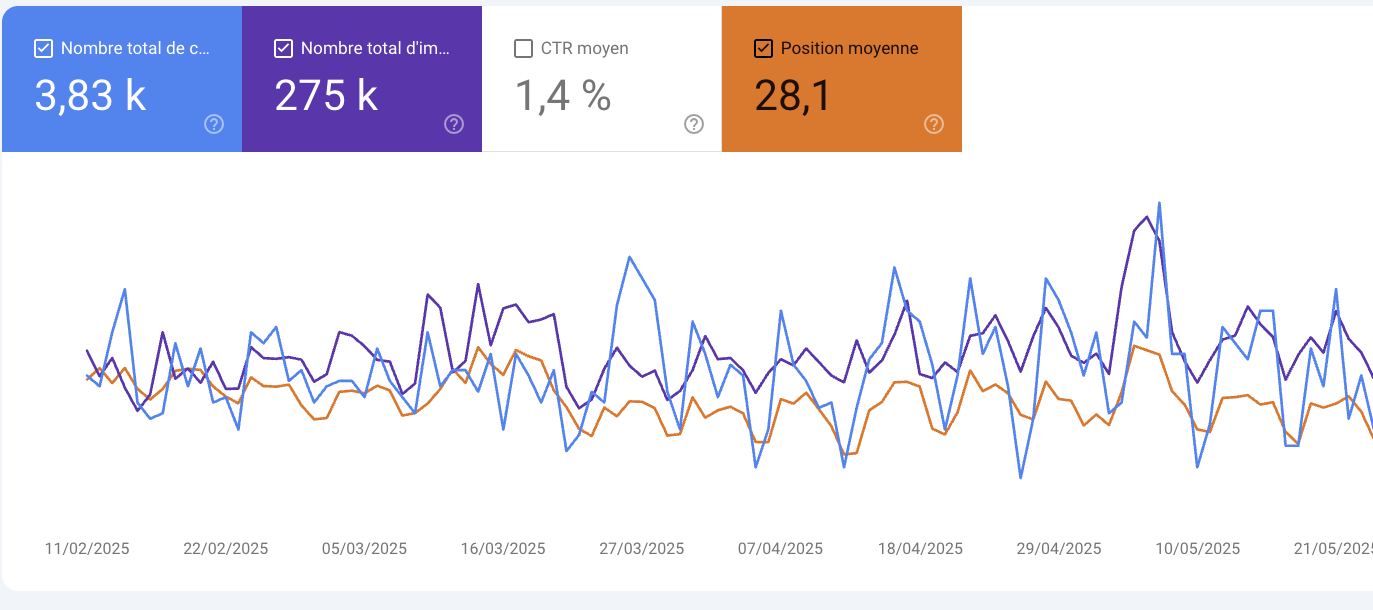
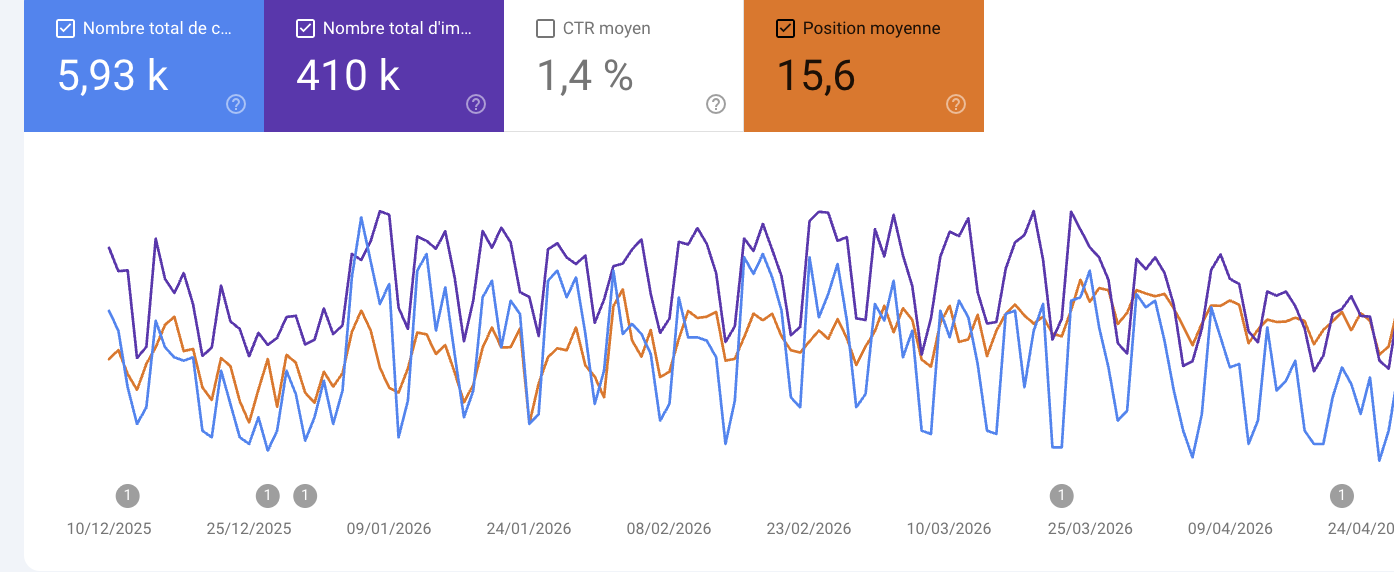
Three Search Console accounts from sites we work on. These are raw screenshots of the Performance tab, untouched. It is also the data two of the six modules take in to produce a linking plan or a cannibalization audit.
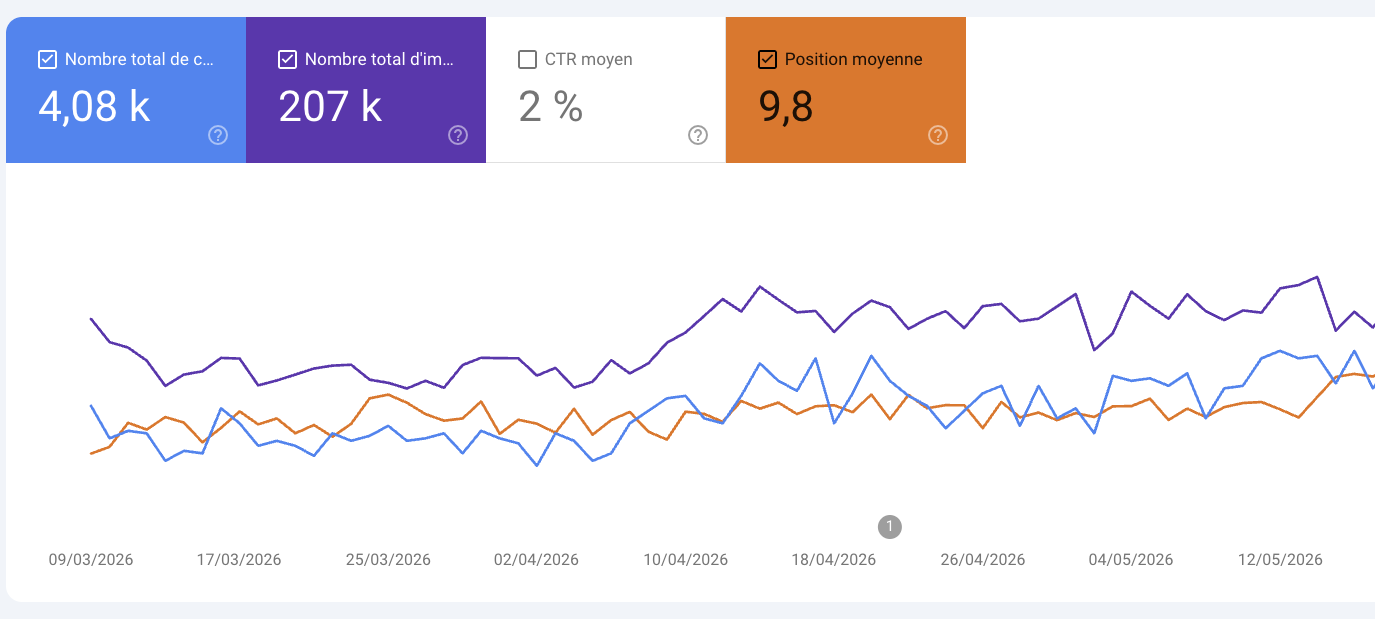
Search Console Performance report over three months: 4.08k clicks, 207k impressions, 2% CTR, average position 9.8
3 months · 4.08k clicks, 207k impressions. Average position 9.8, both curves rise over the period.
Search Console Performance report over six months: 5.93k clicks, 410k impressions, 1.4% CTR, average position 15.6
6 months · 5.93k clicks, 410k impressions. Average position 15.6, the impression volume is established.
Search Console Performance report over a custom period: 3.83k clicks, 275k impressions, 1.4% CTR, average position 28.1
3.83k clicks, 275k impressions. Average position 28.1: the upside sits on page two.
Included in the €99

You are not left on your own. We meet on WhatsApp, one to one, to train the agent.

The agent ships in its standard version. It becomes yours by running on your site, your reports and your notes, and that part we do together.

Tim online
The indexing module found 12 URLs with noindex. Where do I start?
The 3 pages that sell, first. Remove the noindex, run the audit again tomorrow morning, we compare both reports.
What about the other 9? Old tag pages.
Leave them. Module 06 will tell you whether they cannibalize anything. If not, they cost you nothing.
Type a message

The setup guide, free

Where to drop the files, how to check that Lighthouse answers, how to pull a clean Search Console export, and the first command to type. Written for someone who opens a terminal without being a developer.

Your Obsidian vault wired as RAG

The agent digs through your notes before answering: query expansion, multi-pass search, targeted reading of the useful passages, then following wikilinks to neighboring notes. It synthesizes and cites the file each sentence comes from. Your doctrine decides, not the model.

The one to one on WhatsApp

A report surfaces an anomaly you cannot read, you send it to me. I answer on what your report says, not in generalities, and we tune the agent's instructions as we go. Same number my retained clients use.

How it works

Three steps, ten minutes.

01

You download the ZIP

One folder, the six modules inside. Nothing else to install, no account to create.

02

You hand it to your Claude

Unzip it into your skills folder. Claude Code picks up each module on the next launch, with no configuration.

03

You run an audit

You type "indexing audit of my-site.com". The report comes out in markdown: you read it, you fix, you run it again.

Pricing

No, not a subscription. You pay once and you use it as much as you want.

One folder to copy into your skills. You open your terminal, you type "indexing audit of my-site.com", the agent does the rest and answers in markdown. As many times as you want, no quota.

It runs on your machine, with your files. No paid SEO tool to add: the sitemap is public, Lighthouse is free, the Search Console export is yours.

What it is not

  • Not a tool that writes your pages for you.
  • Not a subscription, no account to create.
  • Not an audit with made-up numbers: if something cannot be measured, the agent says so instead of guessing.

99 €199

Launch price. One-time payment, the six modules, updates included. Full price is €199.

  • Indexing audit, 9 checks per URL
  • Core Web Vitals on a mobile sample
  • Structured data JSON-LD derived from content
  • Internal linking by structure
  • Internal linking from Search Console data
  • Cannibalization audit
  • The setup guide, free
  • Your Obsidian vault wired as RAG
  • The one to one with me on WhatsApp
Download the agent